How to show up in AI answers has become the new headache for anyone who runs a website. You put real work into your content, and the page even ranks well on Google, but the AI-generated summary features someone else. You open Gemini or Perplexity and the same thing happens. Worst of all, the reason is almost never clear.
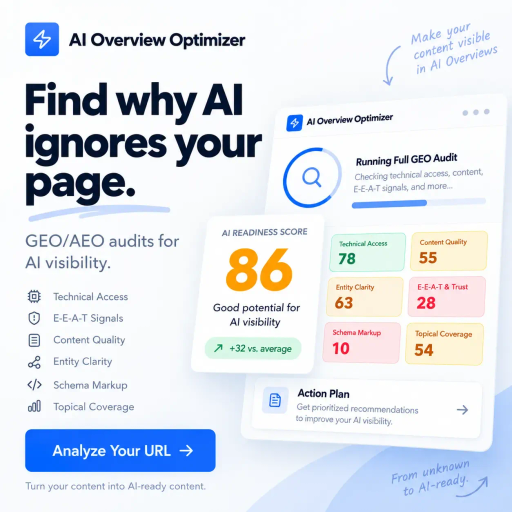
AI Overview Optimizer is a diagnostic tool built to investigate that disappearing act. It does not sit there counting keywords. The idea is to check whether your page is easy for an artificial intelligence to read, understand and cite. In practice, it is SEO for artificial intelligence: finding out what might be blocking your visibility and what is worth fixing first.
The logic behind the tool is simple. When someone asks a question, the AI looks for passages that answer it clearly and can be credited to a source. If your page takes the long way around before getting to the point, it tends to lose ground to pages that get straight to it. AI Overview Optimizer works like a stress test for your content, only from the point of view of a machine.
The core concept is answer blocks. Think of them as short, focused passages with factual information that the AI can grab, summarize and credit to you. A piece of writing can be great for someone reading slowly and still not offer a single block like that. That is exactly what the tool tries to bring to light.
Day to day, it runs a page-by-page audit and points out why AI might be passing over that content. The analysis looks at two sides: technical issues and the way the text is organized. Instead of a generic SEO checklist, the goal is to deliver a prioritized action plan, with specific fixes for each page.
The tool also checks trust signals tied to E-E-A-T (experience, expertise, authoritativeness and trustworthiness) and whether your brand is firmly anchored as an entity in the Google Knowledge Graph. Sounds like a small detail. It is not, since these signals help the AI understand who is behind the content.
There is also an analysis of technical blockers, which tends to catch a lot of people off guard. A badly set rule in robots.txt, a problem in the llms.txt file, a forgotten nosnippet tag or JavaScript rendering failures can hide your page from AI tools without anyone noticing. Sometimes the problem is not in the text at all, but in a setting someone else made years ago.
Two features stand out. The first is the answer density score, which shows how much of your content is structured to be pulled out easily. The second is competitor gap detection: the tool flags questions that other sites answer and you do not yet. That second one, by the way, often turns up good content ideas.
According to the product description, the checks target both Google AI Overviews and the major search engines built on language models. Exactly which platforms are included is something worth confirming on the official website, because this kind of coverage changes often.
The most obvious audience is marketing and SEO teams that watched organic traffic drop after AI summaries took up more space in search. If a page that always brought in visits started losing clicks for no clear reason, it is worth looking at it from this angle. It may not be the only cause, of course, but it is a theory that deserves testing these days.
Publishers and content creators can get a lot out of it too. The tool helps rework articles so the main answer shows up right at the start, without forcing the reader (or the AI) to wade through three paragraphs of background. For people who write a lot, this can even turn into an editing habit.
Business owners join the list when they notice a competitor has become the go-to source cited by AI in their niche. Picture a natural products store that sees its rival pop up in almost every answer on the topic. Understanding why is the first step to competing for that spot with an actual strategy, instead of guesswork.
Teams that already have an organized SEO workflow can use the data as an extra layer, tracking AI visibility alongside traditional search metrics.
And there is a pretty smart use: testing new content before publishing it, to see if it is ready to be read by AI from day one. Fixing things beforehand costs a lot less than rewriting later.
Do not try to audit the whole site right away. Pick one strategic page, ideally one that has lost clicks in recent months, and run your first audit on it. Data from Google Search Console helps you spot these pages with more confidence, because it shows where impressions and clicks have changed.
Once you have the diagnosis, tackle the technical blockers first. There is no point rewriting a page the AI cannot even access. With that sorted out, then it makes sense to move on to the structure of the content.
The basics of AI Overviews optimization are not much of a mystery. Answer directly, organize the text around the questions your audience actually asks, and make it clear who wrote it and where the information comes from. Visible authorship and reliable sources help build the trust signals the tool itself evaluates.
A practical tip: after you make changes, write down the date and what was changed on each page. It feels like paperwork, but it is what lets you know, weeks later, what worked and what made no difference.
As for pricing, the tool presents itself with a freemium model, with per-audit charges tied to AI processing usage and a free entry point for testing. Since prices, limits and terms can change at any time, check the current details on the official website before planning how your team will use it.
No tool guarantees a citation. AI platforms change their criteria without warning, and what matters today may matter less tomorrow. Treat the diagnosis as a map, not a promise of results.
Another point: optimizing for Perplexity and Gemini does not replace traditional SEO. The two go hand in hand, and a lot of what helps one also helps the other. If you want to better understand how each platform works, take a look at our articles on Gemini, the Google AI, and on Perplexity AI.
Also be careful not to turn every article into a string of dry answers. Your brand voice still matters, especially for people who land on your site and decide whether to trust you. The ideal is to have the clear answer up front and then room for context, examples and personality.
Finally, technical changes like edits to robots.txt or llms.txt should be reviewed with whoever manages the site. A mistake there can affect much more than AI visibility, including indexing on Google. When in doubt, test on a less important page before touching everything.
For anyone who truly wants to understand how to show up in AI answers, AI Overview Optimizer is an interesting starting point, mainly because of its narrow focus: it does not try to be a full marketing suite, but to answer one specific question. The smartest path is to start with a few important pages, apply the fixes and track the impact patiently. And if you want to pair this work with more classic content optimization, check out our guide to Surfer SEO and other AI marketing tools here on Método Viral.
Exclusive focus on AI search visibility, diagnosis of why AI ignores the page, answer density scoring, E-E-A-T and Knowledge Graph signal checks, robots.txt, llms.txt and nosnippet tag analysis, per-audit pricing based on actual AI compute usage and one free audit per month.
Page audits for AI Overviews and LLM-powered search engines, diagnosis of the reasons AI skips the page, prioritized action plans with per-page fixes, trust and entity scan with E-E-A-T and Knowledge Graph signals, crawl signal analysis, detection of technical blockers like JavaScript rendering, answer density scoring and detection of questions competitors answer and you do not.
Helps recover traffic lost to AI summaries, points out specific fixes instead of generic checklists, prepares content for AI search, avoids the bloat of full marketing suites, lets you test key pages without a pricey subscription, starts free with one monthly audit
Organic traffic recovery, editorial content optimization for publishers, defense against competitors cited by AI, integration into the SEO workflow, content pre-testing before publishing, SEO professionals and marketing teams
Fill out the form and our team will contact you within 24 hours.

Online
Atendimento
Find out how much the ideal website for your business costs
How many pages do you need?
Drag to select from 1 to 20 pages
In just 2 minutes, automatically find out how much a custom website for your business costs
More than 0+ companies have already calculated their quote
Select the additional features
Estimated monthly traffic
5,000 visitors per month
Do you already have a marketing automation platform?
Select your business industry
The industry may affect the customisation cost
Fill in your details to see the calculator result
Here is the estimated quote for your project
Redirecting to WhatsApp in 5 seconds...
Or click the button below to talk now
This is an estimated quote
Get in touch for a personalised quote
Preencha o formulário e nossa equipe entrará em contato.