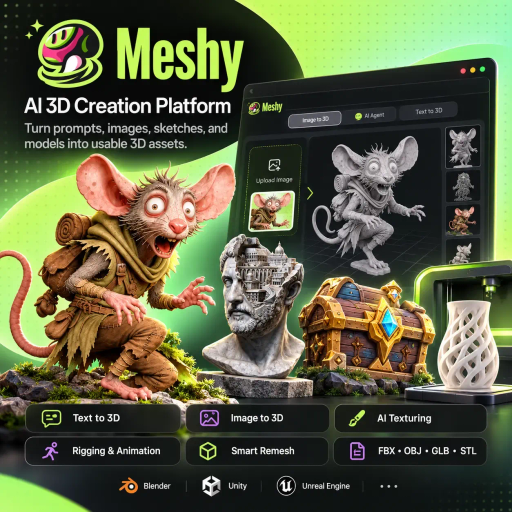
With Meshy AI, you can turn a sentence, a photo or even a rough sketch into a 3D model, without spending weeks learning how to model. If you’ve ever tried to build a 3D piece from scratch, you know how it goes. The process is slow and full of technical steps, and it takes skills that few people on most teams actually have.
The tool shortens that path for anyone who needs product prototypes, pieces for an online store or visuals for campaigns. It won’t hand you a finished, ready-for-anything result every time. Its real strength is different: a fast first version so you can test ideas before spending time and money on polish.
The idea is easy to grasp. You start with a prompt, a reference image, a sketch or a model you already have, and the platform gives you back a textured 3D object. No sculpting vertex by vertex. No spending hours setting up traditional modeling software.
Behind that simple idea, though, there’s a bigger set of features than you might expect at first glance. Each one is worth a closer look.
In text to 3D mode, you describe the object you have in mind and get a first version of the model. Think of it as a three-dimensional draft of your idea. Don’t like it? You can generate again with the same prompt and compare versions until you land on something that works as a starting point.
The image to 3D model option accepts PNG, JPG, JPEG and WebP files. There’s also a workflow that uses several views of the same object, which helps the AI understand its shape from every side. That makes sense. A single front-facing photo leaves a lot for the tool to guess, while different angles give it more clues about volume and proportion.
The AI texturing works with PBR maps, such as diffuse, roughness, metallic and normal. Put simply, the model’s surface gets information about color, shine, metallic look and surface detail, instead of a flat coat of paint. The result tends to look closer to a real material, like plastic, leather or metal, though quality varies depending on the object and the reference you use.
This feature isn’t just for things created inside the platform. Models you upload can also get AI-generated textures, which helps if you already have a base ready and just want to speed up the visual side.
Beyond the basics, Meshy brings together tools that make a real difference in your workflow. There’s Smart Remesh, with control over triangle or quad meshes. There’s character rigging and animation, with a library of movements. And there’s texture editing, file management, batch generation, plugins for Blender and Unity, plus an API for anyone who wants to build 3D generation into their own app or system.
When it’s time to download, available formats include FBX, OBJ, USDZ, GLB, STL and BLEND. This matters more than it seems. These are well-known formats across the industry, so your file plays nicely with other programs, whether that’s a 3D editor, a web page, an augmented reality app or a 3D printer. You’re not locked into the platform once your model is done.
The audience is broad. Still, some people get more out of it than others.
For tech teams, the API opens up another option. Picture a marketplace that wants to let its own users generate a 3D preview of what they’re listing. That kind of integration takes development work and a compatible plan, so the technical and pricing details need to be checked in the official documentation.
First, create an account on the platform’s official website. Then pick the path that fits what you have: text to 3D if the idea is still just in your head, or image to 3D model if you already have a photo or a sketch.
A few tips can change the result a lot. Detailed prompts work better than vague phrases, so mention the material, color, style and shape of the object. With images, go for clean photos with a simple background and good lighting. The less noise in the photo, the less the AI has to guess.
The model shows up right in your browser. Spin it around, look at the details, check the sides your reference didn’t show. If it’s not quite right, generate again. You can also tweak the texture before moving on.
Finally, export in the format that fits where it’s headed. Say a store wants to show a product in augmented reality: GLB or USDZ are usually the natural picks for web and AR. If you plan to print the piece, STL is the most common route. And if you’ll keep working in Blender, you can use the BLEND format or the tool’s own plugin.
The company says there’s a free plan with monthly credits, plus paid plans that add more credits, faster generation, API access and higher usage limits. For businesses, there are options with team workspaces, single sign-on, centralized billing and security controls. Prices, limits and terms change over time, so check everything on the official website before deciding which plan makes sense for you.
The tool is fast, but it doesn’t work miracles. Models may need fixes to proportions and topology, especially for highly detailed pieces or professional use. That’s normal with AI-generated 3D, and going in with that in mind saves you some frustration.
Usage rights deserve special attention. According to the company itself, people on a premium plan own what they create. On the free plan, files fall under a CC BY 4.0 license, which requires attribution. If you plan to sell your models, use them in client projects or publish them in a store, this detail matters a lot. Read the current terms before putting anything into commercial use.
In e-commerce, double-check that colors, shapes and details match the item you’re selling. A model that looks great but differs from the real product sets the wrong expectations and can turn into complaints down the road.
One more thing. Use your own photos or images you have permission to use as references. Building a model from another brand’s photo can cause headaches, even if the result looks different from the original.
If your bottleneck is the prototype stage, the answer is probably yes. The tool shortens the gap between an idea and its first visual, which helps you decide faster what deserves real investment. And if you’ve never worked with 3D, it’s a much less intimidating way in.
On the other hand, if your project calls for fine finishing, clean topology for complex animation or a perfect match to the product, a professional’s eye still makes a difference. In those cases, Meshy speeds up the draft. It doesn’t replace the expert.
A good way to decide is to test it on a real task from your day-to-day work, compare the result with what you’d get otherwise, and only then think about a paid plan. And if you’re putting together your AI creative toolkit, take the chance to explore other Método Viral content on design and artificial intelligence tools to see which ones fit your team’s routine best.
PBR textures with diffuse, roughness, metallic and normal maps, Smart Remesh with triangle and quad control, rigging and an animation library for characters, export to FBX, OBJ, USDZ, GLB, STL and BLEND, plugins for Blender and Unity, and an API to bring 3D generation into apps, marketplaces and custom pipelines.
3D model generation from text, Image to 3D with PNG, JPG, JPEG and WebP uploads, multi view image to 3D workflow, AI texturing for generated or uploaded models, free retry on the same prompt, texture editing, in-browser preview, asset management, batch generation, character rigging and animation, export in common formats.
Speeds up asset creation compared to the traditional modeling workflow, removes the need to know sculpting, UV and topology to get a first model, helps test ideas before investing time in Blender or Unity, delivers realistic textures instead of decorative paint, guarantees asset ownership on paid plans
Game developers, 3D printing hobbyists, product designers, educators, VR teams, creators testing concepts, 3D artists in the drafting stage, teams that want to integrate 3D generation via API
Fill out the form and our team will contact you within 24 hours.

Online
Atendimento
Find out how much the ideal website for your business costs
How many pages do you need?
Drag to select from 1 to 20 pages
In just 2 minutes, automatically find out how much a custom website for your business costs
More than 0+ companies have already calculated their quote
Select the additional features
Estimated monthly traffic
5,000 visitors per month
Do you already have a marketing automation platform?
Select your business industry
The industry may affect the customisation cost
Fill in your details to see the calculator result
Here is the estimated quote for your project
Redirecting to WhatsApp in 5 seconds...
Or click the button below to talk now
This is an estimated quote
Get in touch for a personalised quote
Preencha o formulário e nossa equipe entrará em contato.