AI brand visibility has started to come up in conversations among people who work in marketing. Picture this: a potential customer opens an AI assistant and asks which tool to use to fix the exact problem your product solves. The answer comes back fast and well written, and it mentions your competitor. Your brand does not even show up. You get no alert, nothing appears on your dashboard, and the opportunity slips by without you noticing.
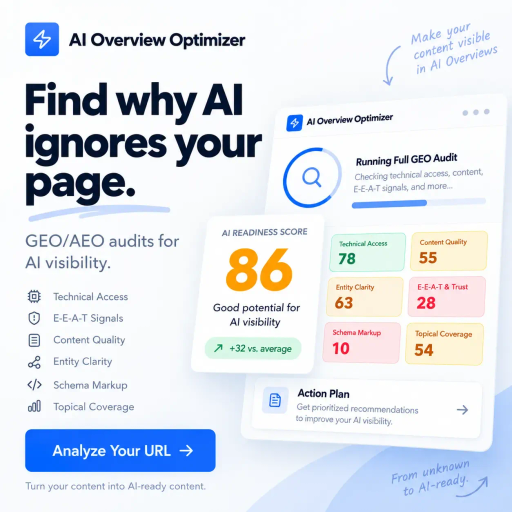
That blind spot is what the Semrush AI Visibility Toolkit tries to shed light on. Instead of looking only at your position on Google, it shows which AI-generated answers mention your brand and which questions your competitors are winning in your place. It also flags technical issues that may keep AI bots from accessing your site.
Below, you will see what the tool does, who it is worth it for, how to take your first steps and what to watch out for before you blindly trust the numbers.
Its main job is to show where your brand appears in AI answers and which competitors get cited when you are left out. Sounds simple. But it changes the kind of questions you ask about your own marketing quite a bit.
A regular rank tracker tells you where your link sits on the results page. The logic here is different. The focus is on being mentioned and cited inside the answer, since in this format people get a ready-made text, not a list of links to pick from.
In practice, the kit brings together a few features:
That daily tracking is what makes brand monitoring in ChatGPT and other platforms possible over time, instead of testing one question here and another there on a whim. The exact list of covered platforms may change, so check the official website to see which ones are available today. If you are still getting to know the OpenAI assistant, it helps to first understand how ChatGPT works day to day.
There are also a few less obvious uses. You can see which websites show up as sources in AI answers, which can guide outreach to media outlets and content partners. You can also check which countries generate the most mentions of your brand, something handy if you sell in more than one market.
The most obvious audience is SEO professionals. They get a way to measure presence in AI answers and, as a bonus, spot technical roadblocks that would slip through a regular analysis.
Content strategists can get a lot out of it too. Prompt research shows the topics people bring to AI tools, which helps build a content plan focused on generative engine optimization, not just Google keywords.
For agencies, the value lies in the competitor reports. It becomes easier to show clients, with real data in hand, where they are losing ground and why it is worth taking action. Brand managers, on the other hand, can see how AI talks about the company and whether the tone of those answers matches the image they want to project.
Semrush itself positions the tool for small and midsize businesses, agencies and marketing teams. Larger organizations with multiple brands and regions have a more robust option, covered further down.
And who might not need it? Teams that only care about traditional rankings, or that are looking for an AI to write and edit content. The goal here is measurement, not content production.
The tool lives inside your Semrush account, in the AI section of the menu. If you already use the platform for other tasks, getting there is quick. If you are new to it, take a look at our guide on what SEMrush offers for SEO and marketing.
A simple game plan for your first few days:
Over time, a light routine does the job. Picture a small online store that sets aside a bit of time each week to review mentions, citations and the tone of the answers, then shares a quick summary with the team. Nothing complicated.
If your visibility suddenly drops, dig in step by step. First, check the daily tracking to see which questions were affected. Next, compare that with your performance in traditional search to figure out whether the problem is across the board or only in AI answers. Finally, run the technical audit to see whether any bot has stopped accessing your site.
Visibility reports can also be added to the regular Semrush reporting workflows. Integrations with Google Analytics and Google Search Console appear to be tied to paid reporting add-ons, so confirm on the official website what is included in your case.
About plans and pricing: the current structure includes a Base plan, billed per domain on an annual basis, and an Enterprise option with custom limits, tailored integrations, API access, single sign-on and team controls. There is also mention of basic checks on the free Semrush plan. Since prices and terms change, check everything on the official pricing page before you decide.
The first point matters most: the metrics are estimates. AI answers change quickly and vary from person to person. Semrush itself admits that no platform can deliver exact AI visibility numbers.
So use the data to spot patterns and gaps. It works well for showing trends and pointing out where to act. Proving precise audience reach, not so much.
Another detail: not every metric works on every platform. In daily tracking, for example, estimated traffic and share of voice do not appear for ChatGPT Search, Google AI Mode and Gemini. Check what is available for each AI before you build reports for your boss or clients, so you do not promise data the tool cannot deliver.
There are also limits on tracked prompts, analyzed domains, reports per day and audited pages, which vary by plan. Confirm those numbers on the official website. And since the Base plan is billed per domain, anyone managing several brands should run the numbers carefully before signing up.
Showing up in AI answers is becoming part of the marketing job, much like showing up on Google did years ago. The tool will not do the work for you. What it does is show where competitors are getting ahead and where it makes sense to focus your effort. If the topic interests you, keep learning about generative engine optimization and test, at your own pace, what makes sense for your business.
Instead of only measuring your position on Google, it compares brand mentions and citations in AI answers and points out the prompts where competitors show up and you don't. The Brand Performance reports show sentiment, share of voice, and the narratives tied to the brand. It also includes an audit that finds technical issues that can block AI bots.
Visibility Overview with a visibility score, mentions, citations, and cited pages by platform and region, Competitor Research to find gaps against competitors, Prompt Research with estimated volume, difficulty, and intent, Brand Performance with sentiment and share of voice, daily Prompt Tracking for the prompts you choose, AI Search Site Audit to check AI bot access to the site.
Shows where the brand is left out of AI answers, reveals the prompts where competitors have the edge, helps plan content based on what people ask AIs, tracks brand perception over time, finds technical blocks for AI bots, makes client reporting easier
SEO specialists, content strategists, agency account managers, brand managers, small and medium-sized businesses, marketing teams that want to measure brand presence in AI search
Fill out the form and our team will contact you within 24 hours.

Online
Atendimento
Find out how much the ideal website for your business costs
How many pages do you need?
Drag to select from 1 to 20 pages
In just 2 minutes, automatically find out how much a custom website for your business costs
More than 0+ companies have already calculated their quote
Select the additional features
Estimated monthly traffic
5,000 visitors per month
Do you already have a marketing automation platform?
Select your business industry
The industry may affect the customisation cost
Fill in your details to see the calculator result
Here is the estimated quote for your project
Redirecting to WhatsApp in 5 seconds...
Or click the button below to talk now
This is an estimated quote
Get in touch for a personalised quote
Preencha o formulário e nossa equipe entrará em contato.