quso.ai is an AI tool for short videos. It takes long recordings, like podcast episodes, livestreams and broadcasts, and turns that material into clips made for social media. The idea is simple: you record once, and the AI hunts for the moments most likely to grab the attention of someone scrolling the feed.
Anyone who creates content knows this problem well. You spend hours recording a great conversation, publish the episode and, a few days later, almost nobody comes back to watch it. The best moments get lost in the middle of an hour-long video. And editing clip by clip, adding captions and scheduling each post takes time that few people have.
Below, you will see what quso.ai does, who it makes sense for, how to get started and what to watch out for before handing your brand social media over to a single tool.
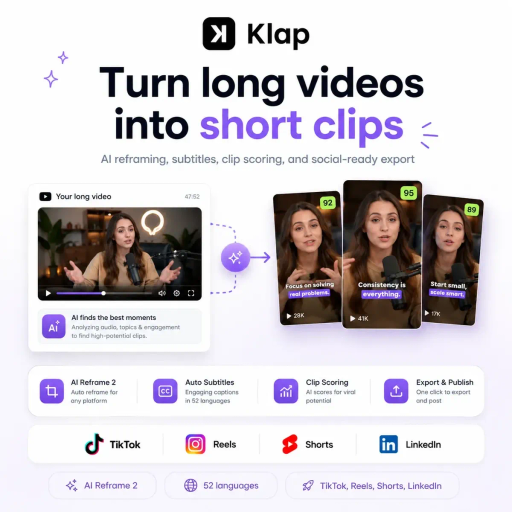
The heart of the platform is AI podcast clips. You upload a long video, whether it is an episode, a livestream or another recording, and the system analyzes the content to point out the moments with the most engagement potential. Instead of rewatching everything to find that one punchy line, you get suggestions to review.
These clips are prepared for TikTok, Reels and Shorts, the short formats that rule our phones today. Since each network has its own quirks, it is worth checking in practice whether the suggested framing works well for your type of recording, especially when there is more than one person on screen.
Another highlight is automatic video captions. They show up animated, word by word, in the style that has become standard on social media. The platform says it supports 99 languages. There is also a feature that removes filler words from speech, those verbal tics everyone lets slip without noticing. Whether this works well with your language and accent is something only a test with your own material will tell.
And the tool goes beyond editing.
It also works as a social media manager, with social media post scheduling from a single calendar. In practice, you schedule and publish clips across different platforms without jumping from app to app. Exactly which networks can be connected is something to confirm on the official website, since that detail may change over time.
Rounding out the package are a few support features:
A technical note for product or tech folks: the tool is not open source, and a public API does not show up in the information we reviewed. If integration with other systems is a priority for your team, confirm this directly with the company.
The most obvious profile is the entrepreneur who records a podcast or goes live and has no time to edit. For that person, turning one episode into several posts without opening a traditional video editor already takes care of a big chunk of the routine.
Lean marketing teams also tend to benefit. Keeping up a steady posting schedule with a small crew is a constant challenge, and having clips, captions and scheduling in one place cuts down the back-and-forth between tools. Fewer open tabs, fewer files downloaded and uploaded all over again.
The third group is creators and brands that want to repurpose the same content across several channels. Picture, just as an example, a consulting firm that hosts a monthly livestream with clients. A single session can turn into several clips for Instagram, TikTok and YouTube, spread out over the month, instead of becoming a video nobody watches anymore.
Now, to be honest: if you hardly produce long-form video, the tool loses much of its appeal. People who mostly work with static posts, carousels or short videos recorded one at a time will probably get little out of the main feature, which is precisely digging up great moments inside long recordings. In that case, a tool focused only on scheduling or design might make more sense.
Start with what has already worked. Pick an episode or livestream that got a good response from viewers. That makes it easier to judge whether the clips the AI suggests match what you already know works with your audience. If the tool points to exactly the moments that sparked comments, that is a good sign.
Before generating your first clips, set up the brand kit with whatever visual elements the platform allows. It seems like a small detail, but it saves rework and keeps everything looking like the same brand from the very first post.
Once the clips are ready, review each one and tweak the captions. The AI speeds up the process. You are still the one who decides what goes live.
Then, line up a few days of posts on the calendar and keep an eye on the metrics without rushing. There is no need to draw conclusions too fast: the early goal is to notice which kinds of clips get the most response and use that to fine-tune the next ones.
About pricing: quso.ai is presented as a paid tool. Prices, plans, trial periods and usage limits were not detailed in the information we reviewed, so check everything on the official website before subscribing. That way you avoid surprises on your bill and pick the plan that best fits the volume you plan to produce.
The AI picks the clips, but the context of what was said is the responsibility of whoever publishes it. A sentence pulled from the middle of a conversation can sound very different from what the guest meant. So review every clip before scheduling, even when you are in a hurry.
Also check how accurate the captions are in the language you record in. Names, technical terms and slang are usually where transcription tools stumble the most, and an error on screen jumps out at anyone watching with the sound off. A quick read before publishing solves most of these problems.
Another sensitive point is image rights. If your podcast has guests, agree with them on using the clips on social media before you post. It is a quick conversation that saves you a headache later.
It is also worth understanding how the platform handles the videos you upload. Read the terms of use and privacy policy on the official website, especially if your recordings include client information or internal company data.
Finally, do not centralize everything at once. Test with a few episodes, compare the results with your current workflow and only then decide whether it makes sense to put your whole social media operation into a single tool. If you ever want to switch to something else, it is better not to depend on it for everything.
The main benefit of quso.ai is helping you turn long content into several short posts, with clips, captions and scheduling all in one place. For anyone who already records podcasts or goes live often, that can free up a good amount of time. For those who rarely work with long-form video, the payoff tends to be smaller.
The best way to find out is to test it with your own material, always reviewing what the AI delivers. If you are building your production toolkit, take the chance to read other articles here on Método Viral about AI tools for short videos and marketing automation, and compare the options before picking yours.
It doesn't stop at the clip. Besides finding the most engaging moments and creating word-by-word captions in 99 languages, it also works as a social media manager, with scheduling and publishing to multiple platforms from a single calendar. It can also remove filler words to give you a cleaner final result.
Automatic detection of the most engaging moments in long videos, podcasts, and livestreams, short clip creation for TikTok, Reels, and Shorts, word-by-word animated captions in 99 languages, filler word removal, scheduling and publishing to multiple social networks from one calendar, brand kit, AI content planner, B-roll library, and social media performance analytics.
Saves the time spent editing clips by hand, gets more value out of long-form content, makes videos more accessible with captions in many languages, delivers cleaner clips without filler words, keeps publishing in one place, helps maintain brand identity, and makes it easier to track audience growth.
Content creators, podcasters, streamers, businesses that produce long videos, social media teams, anyone posting on TikTok, Reels, and Shorts, and brands that want to grow their audience with short clips.
Fill out the form and our team will contact you within 24 hours.

Online
Atendimento
Find out how much the ideal website for your business costs
How many pages do you need?
Drag to select from 1 to 20 pages
In just 2 minutes, automatically find out how much a custom website for your business costs
More than 500 companies have already calculated their quote
Select the additional features
Estimated monthly traffic
5,000 visitors per month
Tools like RD Station, Mautic, HubSpot or ActiveCampaign
Select your business industry
We use the industry to tailor your project
Fill in your details to see the calculator result
Here is the estimated quote for your project
Redirecting to WhatsApp in 5 seconds...
Or click the button below to talk now
Redirect cancelled. Use the button below whenever you like.
This is an estimated quote
Get in touch for a personalised quote
Preencha o formulário e nossa equipe entrará em contato.